SMS Messaging Terms & Opt-In
Last updated: July 2026
Program Description
Occasion.fyi sends SMS text messages only to users who opt in, for two purposes:
- Occasion reminders — alerts about upcoming birthdays, anniversaries, and other dates you have configured in your account.
- A one-time verification code sent during setup to confirm you own the mobile number you provide.
How to Opt In
SMS is off by default. To enable it:
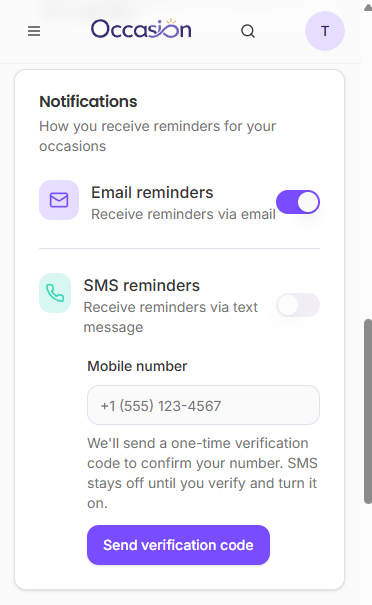
- Sign in to Occasion.fyi and go to Settings → Notifications.
- Enter your mobile phone number.
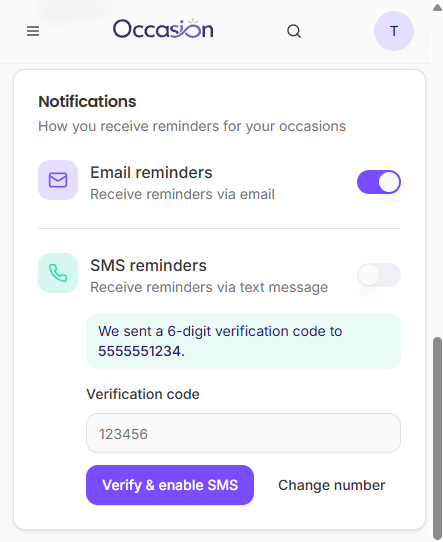
- We send a one-time verification code to that number.
- Enter the code in the app to confirm ownership of the number.
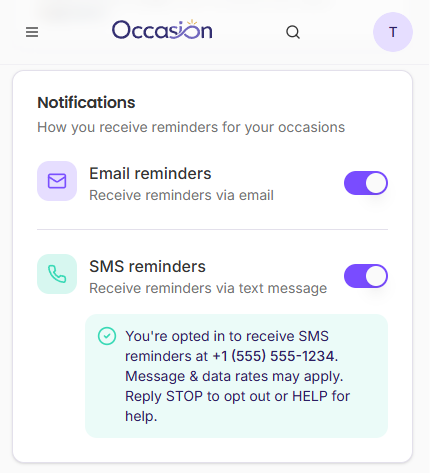
- Turn on the SMS reminders toggle. Until you do, SMS stays fully disabled.
- You'll see and receive a confirmation that you're opted in.
Message Frequency
Frequency varies and depends on how many occasions you configure. You only receive messages tied to dates and reminders you set up yourself.
Rates
Message and data rates may apply.
Opt-Out and Help
- Reply STOP to any Occasion.fyi message to unsubscribe. You'll get a confirmation and receive no further messages.
- Reply HELP for help.
- Reply START to resume messages after opting out.
- You can also disable SMS anytime in Settings → Notifications.
Sample Messages
- Verification: "Occasion: your verification code is 123456."
- Opt-in confirmation: "Occasion: You're opted in to receive SMS reminders for important dates. Message & data rates may apply. Reply STOP to opt out or HELP for help."
- Reminder: "Occasion: Reminder — Mom's birthday is in 3 days (Jul 12). Open Occasion to send a card."
Privacy
We do not share your mobile opt-in information or phone number with third parties or affiliates for their marketing or promotional purposes. See our Privacy Policy for details.